
Technology Information
-
Chromebook Information
Norfolk Catholic School's curriculum is designed to prepare our students for college as well as for the working world. In today's world, students need to be connected to information to be successful in school.
In an effort to provide 24-7 access, Norfolk Catholic will issue students in grades 7-12 a Chromebook to use for education. This site contains information pertaining to Chromebook use here at Norfolk Catholic. Under the Acceptable Use & Technology Use Guidelines you will see rules pertaining to school-issued devices along with any other electronic device brought to school and connected to our network. Your teacher may have additional guidelines and rules to follow regarding chromebook usage in their classrooms.
Chromebooks look and feel like a laptop. They are designed to get things done faster and easier with a built in Chrome operating system. They have multiple layers of security and cloud storage along with Google Apps. As long as a student has their device and access to the internet, it is literally impossible for a student to lose an assignment. Assignments found on google classroom can be accessed any time of the day simply by logging into a google account. Chromebooks make it easy to transport data and the device itself is portable and rugged. If something should ever happen to your Chromebook, it is very easy to retrieve all of your information within minutes from the cloud using another device. They are easy to manage and filtering will be set up for both at school and for in home use.
-
Chromebooks for Education
Devices for School Use
1. Chromebooks for 7-12 students may be used both inside and outside of school. A student may loose device privileges due to a violation of the guidelines listed under the Acceptable Use/Internet Use Policies which were signed when the device was initially checked out.
2. Computer devices must be attended or secured at all times. Unattended devices will be picked up and retained in the Principal's office. Confiscated devices may be retrieved from the Principal's office at the end of the school day.
3. Students are responsible to bring their school-issued devices to class fully charged and functioning. Devices should always be with the student and brought to class daily.
4. Devices issued to students are to be used for school work and learning. In case of device failure, students will be able to check out a temporary replacement from the library at Norfolk Catholic. Personal devices from home can not be used as a substitute for school-issued devices as they do not have the appropriate settings and software for maximum classroom efficiency.
5. The Chromebook and charger will have a school-issued ID and labeling that the student is responsible for maintaining. The label must be attached and readable on both devices at all times. The student is also responsible for keeping the school-issued device clean. Proper cleaning supplies are available at the Norfolk Catholic High School Library.
6. Any cost incurred by public/personal use of the device outside of the school is the responsibility of the student (examples include but are not limited to: internet access fee at a hotel, internet fees to wireless provider at home, or apps/extensions downloaded for use.)
7. The student is responsible for managing the volume on their device so that it does not infringe upon the learning opportunities of others.
8. Computers and network access are provided for educational activities. Inappropriate and illegal activities are prohibited at all times.9. Access to the technology systems provided by Norfolk Catholic is a privilege, not a right. Norfolk Catholic retains the authority to revoke access and or apply disciplinary measures if the terms of the Acceptable Use Policy or Internet Use Agreement are violated. Norfolk Catholic exercises exclusive control over its system. Users expressly consent to possible monitoring by school officials. Device and accounts are subject to inspection at any time, including e-mail, storage files, and current activity.Inappropriate Use of the Device or Charger
Norfolk Catholic reserves the right to define inappropriate use of a device as it sees necessary. The following rules serve as a guideline in determining inappropriate practices. There may be other inappropriate uses as determined by school administration.
1. Students should never placed excessive weight on the lid of the device or place any object on the keyboard of the device.
2. Students should not erase, change, rename, or make unusable, any computer files or software belonging to Norfolk Catholic High School.
3. The student shall not use or try to discover another persons password or use another person's files.
4. The student should not use a device for any unlawful purposes such as illegally copying or installing software, music, videos, or other mediums not belonging to them.
5. The student should not let others use his/her name/login/ or password for any reason.
6. The user shall not deliberately use the device to annoy or harass others in any way or in accordance with Norfolk Catholic's Policy on Bullying.
7. The user shall not deliberately access or create any obscene or objectionable information, language, or images using a school-issued device. All school issued devices are equipped with mobile filters and anytime they access the internet the device will be filtered and can be monitored.
8. Students will not deface the device or charger in any way (for example writing on either piece of equipment with pen or permanent marker, attaching stickers or tape that leaves residue, etc.)
9. Chromebooks should be carried by either the handle or the supporting base, At no time should the student move it by holding the monitor.
10. A damaged device must be brought to the tech coordinator. No repairs are to be attempted by anyone but school professionals as some warranties are provided with each unit. Damage to the device (either deliberately or irresponsibly) is the responsibility of the student.11. It is the students responsibility to to report a lost or stolen school-issued device to school authorities immediately.12. School-issued Chromebooks and chargers must be returned to Norfolk Catholic at the end of the school year. Students who withdraw or terminate enrollment at Norfolk Catholic for any reason must return their school-issued device and charger in, on or before the date of termination. Failure to return the device and charger will result in a theft report being filed with the appropriate law enforcement agency if necessary.Student teachers, administrators, and employees are all part of an electronic community because of their common use of the school's devices, equipment, and computer networks. The Norfolk Catholic Computer Use Policy describes acceptable behaviors. The following guidelines summarize student responsibilities under that policy. A copy of a full policy can be obtained from the Norfolk Catholic High School Office.
Federal law requires schools to block or filter offensive internet materials. Attempts to deliberately access such material will result in disciplinary action. If a legitimate internet source is blocked preventing you from completing assigned work, ask your technology specialist to access the site and unblock it for you. Also know that while filters are in place due to the high volume of content becoming available each day, some inappropriate content may be available. If a student accidentally access such a site, they should report it to their teacher or technology specialist immediately.
-
Acceptable Use Policy
Parental & Student Responsibilities
In order to take your 1:1 device home each day, you must be willing to accept the following responsibilities:
Student:
- When using the device at home, school, and anywhere else I may take it, I will follow the policies at Norfolk Catholic, including the Acceptable Use Policy. I will also abiding by all local, state, and federal laws.
- I will treat the device with care by not dropping it, getting it wet, leaving it outdoors, or using it with food or drink nearby.
- This device is my responsibility and will stay in my position at all times.
- I will not modify any software.
- I will honor my family's values when using this device.
- I will not release personal information to strangers when using my device.
- I will bring my device to school every day.
- I will keep all accounts and passwords assigned to me secure, and will not share these with any other students.
- I will clean my device using only the cleaner cloth provided by the school.
- I will recharge the battery each night.
- I will return the device when requested and upon my withdrawal from Norfolk Catholic.
Parent:- I will supervise my son't/daughter's use of his/her device at home.
- I will discuss our family's values and expectations regarding the use of the internet at home and will supervise my son's/daughter's use of the internet.
- I will not attempt to repairs on school owned devices.
- I will report to the school any problems with my device.
- I will make sure my son/daughter recharges the battery nightly.
- I will make sure my son/daughter brings his or her device to school everyday.
- I understand that if my son/daughter comes to school without his/her device, I may be called to bring it to school.
Screens can be damaged if subjected to rough treatment. The screens are particularly sensitive to damage from excessive pressure.- Do not lean on top of the device when it is closed.
- Do not put books on top of the device when it is closed.
- Do not place anything between the screen and the keyboard and then close the lid.
- Clean the screen with a soft, dry cloth.
- Be careful about putting the device in your book bag.
- Close the lid when carrying your school owned device.
- Do not carry your device by the screen.
- Do not "bump" the device against lockers, walls, car doors, floors, etc. as it will eventually break the screen.
End of the YearAt the end of the school year, students will turn in their Chromebook and all issued peripherals. Failure to turn in a Chromebook will result in the student being charged the full $279.00 replacement cost. The school may also file a report of stolen property. Failure to turn in a Mac Book Pro will result in the student being charged a $500.00 replacement cost.
Transferring/Withdrawing Students
Students who transfer out of or withdraw from the Norfolk Catholic much turn in his or her device on the last day of attendance. Failure to turn in your 1:1 device will result in the student being charged the full replacement cost.
-
Internet Use Policy
Internet access is made available through our local provider and is made accessible and monitored through our school network. The smooth operation of the network relies upon the proper conduct of the users who must adhere to the guidelines set and reviewed by our technology committee. These guidelines are provided so that you are aware of the responsibilities you are about to aquire. Students or staff knowingly violating the terms of the policy will be dealt with according to the student or staff discipline policies at Norfolk Catholic.
In accordance with the Children's Internet Protection Act, Norfolk Catholic installs and operates filtering software to limit users' Internet access to materials that are obscene, pornographic, harmful to children, or otherwise inappropriate or disruptive to the educational process. At the same time Norfolk Catholic can not guarantee that filtering software will in all instances successfully block access to materials deemed harmful, indecent, offensive, pornographic, or otherwise inappropriate. No technology is guaranteed to be error-free or totally dependable, nor is it safe when used irresponsibility. Norfolk Catholic is also not responsible for the accuracy or suitability of any information that is retrieved through technology along with any breaches in confidentiality.
Students may access technology for educational purposes only. The actions of users accessing Norfolk Catholic’s network reflects our school. Student users must conduct themselves accordingly by exercising good judgement and complying with this policy and any accompanying administrative regulations and guidelines. Students are responsible for their behavior and communications using Norfolk Catholic’s computers and networks.
Norfolk Catholic is not liable for any damages or loss. Manufacturer defects will be covered by the manufacturer's warranty. Do not try to fix any device issued by the school as any possible warranty will be voided. Damages or loss that is the result of the student’s failure to exercise reasonable care or willful conduct will not be covered by the school. The student will have the sole responsibility of paying replacement or repair costs if a device is stolen, lost, or damaged beyond warranty coverage. If a device is stolen the school must be notified within 24 hrs. of the discovery of theft. The technology fee does not cover the cost of ANY repairs or stolen devices.
When a student withdraws from the enrollment of the school or has his or her rights terminated, the student must return any devices issued by Norfolk Catholic to the school immediately. If a student fails to return the device in a timely manner the student and his or her parents will be subject to paying replacement costs. Equipment will be returned when requested by Norfolk Catholic for routine maintenance and other special needs.
Terms and Conditions
The use of equipment, computers, network resources and the Internet is a privilege, not a right. Inappropriate use can result in a cancellation of those privileges. The administration, faculty, or staff at Norfolk Catholic may deny, revoke, or suspend specific user accounts/access. Violations of local, state, or federal law may subject students to prosecution by appropriate law enforcement authorities. The use of your account and/or access must be consistent with the educational objectives at Norfolk Catholic. The use of electronic resources not provided by the school or the playing of recreational games is prohibited during school hours (this includes the use of cell phones).
Network Etiquette - You are expected to abide by the generally accepted rules of network etiquette. These include, but are not limited to, the following:
- Be polite. Do not be abusive in your messages to others and use appropriate language. Do not swear, use vulgarities, or any other inappropriate language, material, or images.
- Comply with copyright laws and licensing agreements including plagiarizing or claiming another person’s writing as your own.
- Do not use electronic resources or the network in such a way that you would disrupt the use by other people.
- Be responsible at all times for the proper use of technology, including proper use of access privileges, not sharing any school issued devices, codes, or passwords.
- Do not partake in any business or commercial activities or use the school owned device or hardware to obtain financial gain.
- Do not engage in hacking of any kind.
- Do not allowing others to use property issued under the 1:1 program without authorization, this includes students whose access privileges have been suspended or revoked.
- Soliciting or distributing information with the intent to incite violence, cause personal harm, damage a person’s character, or harass another individual or an organization through cyber threats or any other forms.
- Note that electronic mail (e-mail) and other computer use or storage is not guaranteed to be private or confidential. Network or other computer use or storage areas are and will be treated as school property. Any electronic device such as computers, Chromebooks, iPads, phones, files, or communications may be accessed and reviewed by school personnel.
-
Online Safety
Online Safety
Keeping our Kids Safe!
Norfolk Catholic recommends that parents/guardians read and follow the US Department of Justice Guidelines for Parents/Guardians on Internet Safety located at:
https://www.justice.gov/criminal-ceos/children-internet-safety
Technology is an integral part of our students lives. This creates both opportunities along with many dangers. There are some excellent resources to help both schools and parents find information about Internet safety. These sites provides resources about appropriate sites and apps along with reviews on music, movies, and apps.
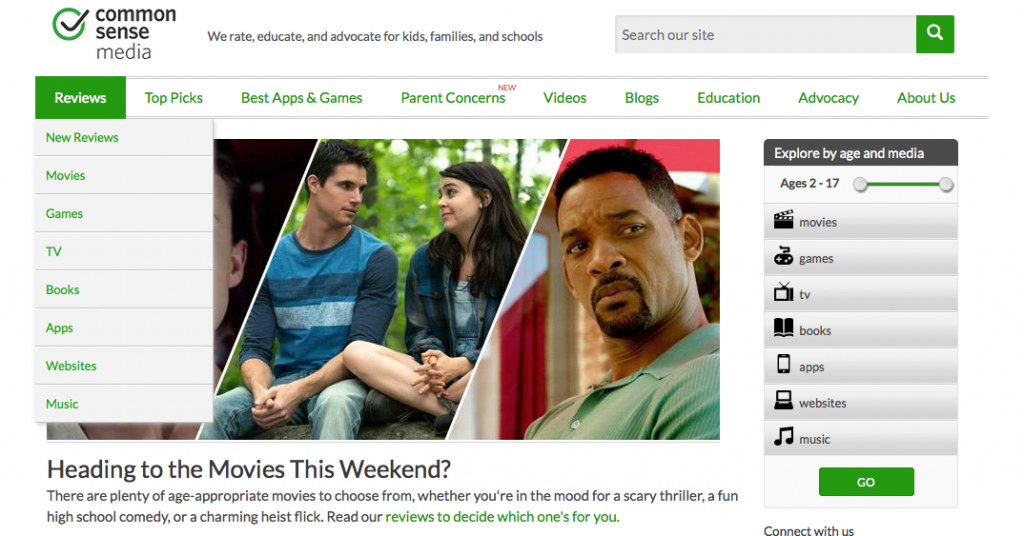
Parent Concerns is a helpful link on Common Sense Media. You can get information on Cyberbullying, Social Media, along with many other topics today's teens are faced with. There are video that you can watch along with articles and reviews for you to read. This link provides a lot of information and could help answer some of your questions. Our school also uses this site as a curriculum guide to teaching Digital Citizenship to some of the students.
To visit this site, please click on the picture below.

Common Sense Media. (n.d.) Retrieved November 20, 2017, from https://www.commonsensemedia.org/
-
Graduating Senior Information
July 15th is the day your account will be suspended. It will not be deleted, but instead suspended so reactivation is possible if needed. Before July 15th be sure to get any documents, pictures, or email contacts off of your google account and into another account of your choice. Be sure all your contacts know of your new email address. Good luck to all of you and if you should have any trouble feel free to contact me:This email address is being protected from spambots. You need JavaScript enabled to view it.
Transferring files from Google Drive to Outlook
Transferring files from a Google Drive to a new Google Drive Account and changing ownership
-
Using the Chromebook
Additional information about how to use your Chromebook
Quicklinks:
Using Your Chromebook Keyboard
Using your Chromebook touchpad
For those students who need the keyboard in another language or with special characters.
Printing with your Chromebook
Students will be encouraged to digitally publish and share their work with their teachers and peers when appropriate. This will be a huge savings for the school as it will save on printing supplies and paper. However, sometimes it is necessary to print a document. In this case students will need to log onto a desktop computer found in our library lab and print from there. School printers are not set up with "cloud printing" solutions at this time. Students may also set up their home printers with the Google Cloud Print solution to print from their Chromebooks. Information about Google Cloud Print can be obtained here:
Click here for directions on how to set up Google Cloud Print
Please use the Form Link below to submit any issues you may be having with your Chromebook.
-
Chromebook FAQs
1. What happens if a student damages or loses their Chromebook? Will there be an insurance policy available for coverage of theft or damage?
As part of the Chromebooks for Education program at Norfolk Catholic has in place, the school recommends, but will not require, parents to include their child's device on their homeowners policy. The Chromebooks do have warranties in place, but they are limited to manufacuturer errors. It is the student’s responsibility to care for and protect his/her device. Parents/Students will be charged for full replacement cost of a device that has been damaged due to intentional misuse or abuse. The Chromebooks are not covered for loss of the device and/or its accessories. In the case of theft, a police report must be completed and turned in to the school. The full replacement cost will be charged for lost or stolen devices. This cost will be refunded if the device is recovered and returned in working order.
All chromebooks in need of repair must be brought to the Library as soon as possible. If a loaner Chromebook is needed, one will be issued to the student until the Chromebook can be repaired or replaced.Is it required for students to use a Chromebook?Yes. Students are expected to bring a fully charged Chromebook to school every day and bring their Chromebooks to all classes.
2. Can my child use their own device?
No. Students in all grades will no longer be able to use their own device in the classroom. For management, equity, and safety reasons, students will only be using school-issued devices.
3. Can my child bring their Chromebook home with them?
Yes, and they are encouraged to do so!
4. What if we don’t have internet at home?
While a Chromebook does require WiFi for much of its functionality, there are several features that can be utilized offline. Students and staff will receive training on what can be done without an internet connection so that time spent at home with the Chromebook is most effective.
5. How are you monitoring searches and activity?
The school utilizes an Internet content filter that is in compliance with the federally mandated Children’s Internet Protection Act (CIPA). Our filtering solutions is called GoGuardian and it monitors activity on the Chromebooks at all times, at all locations, and regardless of what account is used to log-on to the device. All Chromebooks, regardless of physical location (in or out of school), will have all Internet activity protected and monitored by the district. If a website is blocked in school, then it will be blocked out of school.
6. Will my child be able to have their Chromebook over the summer?
No. Students will check in their Chromebook at the end of each year so they can be inventoried and have maintenance performed on them.
7. Will students be allowed to purchase their Chromebooks at the end of their senior year?
No. The Norfolk Catholic Chromebooks for Education program is on a rotation cycle where all Chromebooks are kept and passed onto younger students.
8. Will students have textbooks?
Yes. The intent of the 1:1 initiative is to provide additional technology tools to be used for student learning. Some classes may have electronic materials to replace print materials. Some classes will use the Chromebooks to supplement existing curriculum in place.
9. What available programs are there for the Chromebook?
The Chromebook relies on cloud-based services and applications for its functionality, with Google Apps being the primary resource. However, there are many web tools and internet applications in the Chrome Web store that will provide the students and teachers with productivity and creativity outlets. Some courses have "online" or digital textbooks that can be used with the Chromebooks to enhance learning.
- 1